Choosing the right 92 inch projector screen can significantly improve image quality, viewing comfort, and room aesthetics. This guide evaluates five 92″ options that balance picture performance, ease of installation, and value. Each selection targets living rooms, basements, or dedicated home theaters, and supports common formats like 4K and HDR. Whether you prefer a fixed frame, a motorized model, or a recessed tab-tensioned screen, this overview helps compare capabilities side by side to fit your space and projector type.
| Product | Type | Diagonal | Surface / Gain | Mount |
|---|---|---|---|---|
| Silver Ticket STR Series STR-16992-G | Fixed Frame | 92″ | Grey Material, 1.0 Gain | Wall Mounted |
| Elite Screens M92UWH | Manual Pull-Down | 92″ | MaxWhite 2, 1.1 Gain | Ceiling or Wall |
| Kshioe 92″ Motorized Screen | Motorized with Remote | 92″ | 1.3 Gain | Wall or Ceiling |
| Yescom 92″ Motorized Projection Screen | Motorized with Remote | 92″ | Surface not specified | Wall Mounted |
| Elite Screens Evanesce ETB92HW3-E12 | Tab-Tensioned In-Ceiling | 92″ | CineWhite, 1.1 Gain | Recessed In-Ceiling |
Silver Ticket STR 92-Inch Fixed Frame Screen

The Silver Ticket STR-16992-G is a wall-mounted fixed frame projection screen designed for a 92″ diagonal viewing area. The overall frame measures about 49.75″ tall by 84.75″ wide, with the actual viewing area at 92″ diag and 16:9 aspect. The material is a light grey with a 1.0 gain, which can affect perceived brightness compared to white surfaces. The frame uses a heavy-duty beveled aluminum structure wrapped in black velvet to deliver crisp image edges and reduce light reflections. It supports Full HD, 4K, and 8K content and is compatible with Active 3D, though some ultra-short-throw (UST) projectors may require a different frame for optimal alignment.
- Diagonal: 92″
- Aspect: 16:9
- Gain: 1.0; Grey material
- Frame: 2 3/8″ beveled aluminum, wrapped in velvet
- Mount: Wall mounted; fixed frame
Installation notes emphasize proper alignment with a standard throw projector. The fixed frame design ensures a taut, flat viewing surface with minimal movement, but it lacks built-in portability. This makes it a solid choice for room setups where the screen remains in a single position and the projector is front-facing.
Elite Screens Manual Series 92-Inch Screen

The Elite Screens M92UWH is a 92-inch diagonal pull-down manual screen with a 16:9 aspect ratio. It uses MaxWhite 2 fabric with a 1.1 gain and a wide 180-degree viewing angle. The material features a fully black-backed front projection surface designed for high contrast and color fidelity, suitable for 4K Ultra HD and Active 3D projection. GreenGuard and GreenGuard Gold certifications indicate safer indoor use. The case is black, and the overall dimensions accommodate a typical living room ceiling or wall mount. This model is ideal for rooms with ambient light control and occasional retraction needs.
- Diagonal: 92″
- Gain: 1.1; MaxWhite 2
- Surface: Front projection, black backed
- Viewing angle: 180 degrees
- Mounting: Ceiling or wall; manual pull-down
This option balances straightforward operation with reliable image quality, making it a practical upgrade for home theaters that want a simple, durable pull-down screen without powered motors.
Kshioe 92-Inch Motorized Projector Screen

The Kshioe 92″ motorized screen provides convenient remote operation with a 16:9 aspect and a 92″ diagonal viewing area. It features a 1.3 gain screen to offer higher brightness and improved contrast in varied lighting environments. The wireless remote lets you start the screen from anywhere in the room, and its installation supports both wall and ceiling mounting. It is suitable for home theaters, classrooms, and corporate presentations where quick setup and quiet operation are important. The model is designed for typical home theater projectors and can adapt to many spaces with ease.
- Diagonal: 92″
- Aspect: 16:9
- Gain: 1.3
- Remote control: Wireless
- Mounting: Wall or ceiling
Motorized operation offers effortless screen deployment, but consider room acoustics and seating distance to maximize the benefit of the screen’s brightness and color performance.
Yescom 92-Inch Motorized Projection Screen

The Yescom 92″ motorized projection screen offers a 16:9 format with remote control for easy up-and-down operation. The design emphasizes compact installation and smooth retraction, making it suitable for home theaters, classrooms, and small-to-mid sized meeting rooms. While the product page emphasizes automatic down and play, the screen is intended for standard throw projectors and can be mounted on walls or ceilings depending on room constraints. It is a convenient option for space-conscious setups where quick deployment is beneficial and noise is minimized during operation.
- Diagonal: 92″
- Format: 16:9
- Remote operation
- Mounting: Wall or ceiling
- Design focus: Compact, easy installation
Consider room lighting and projector type to ensure the screen’s brightness and color performance meet your viewing expectations.
Elite Screens Evanesce Tab-Tensioned 92-Inch Screen
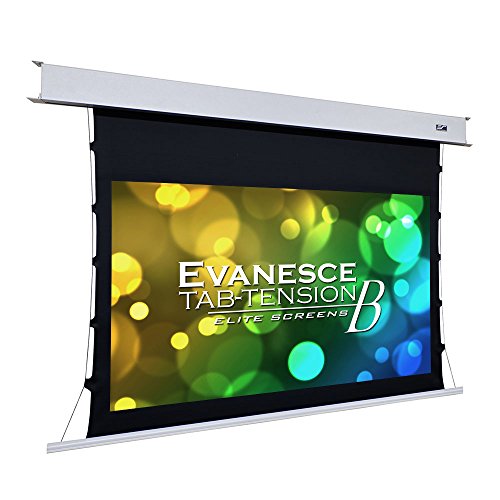
The Elite Screens Evanesce Tab-Tension B model is a recessed in-ceiling screen designed for clean, unobtrusive installations. It features a 92″ diagonal with a 16:9 aspect ratio and a CineWhite 1.1 gain surface that supports 4K Ultra HD and Active 3D projection. The tab-tension design maintains surface flatness for uniform image clarity, with a 160 degree viewing angle and a fully black-backed front surface to minimize light bleed. The kit includes a programmed remote, making it a strong choice for dedicated home theaters with ceiling installation preferences.
- Diagonal: 92″
- Aspect: 16:9
- Gain: 1.1; CineWhite
- Surface: Front projection, black-backed
- Mounting: In-ceiling; tab-tensioned
Tab-tensioned screens reduce wrinkles and ensure sharp, edge-to-edge clarity, especially beneficial in rooms with ambient light controls and higher-end projectors.
Buying Guide
Key purchase considerations help narrow choices among fixed-frame, manual, motorized, and tab-tensioned designs. The right combination depends on room layout, projector throw, and how you plan to use the space.
- Screen Type: Fixed-frame screens deliver taut surfaces ideal for static setups, while manual pull-downs are budget-friendly and space-flexible. Motorized screens offer convenience and hidden installations, with some models designed for wall or ceiling mounting. Tab-tensioned screens, especially in-ceiling installations, minimize wrinkles for a cinema-grade surface.
- Diagonal and Aspect: A 92″ diagonal is common for mid-size rooms. Ensure the aspect ratio is 16:9 to match most modern projectors. Be mindful of the viewing distance; for 92″ screens, seating about 8-10 feet away provides a comfortable field of view for most content.
- Surface and Gain: White surfaces with 1.0 to 1.1 gain are standard for bright rooms and general viewing. Grey screens can improve black levels in brighter rooms but may reduce perceived brightness. Consider room lighting and projector brightness when choosing surface color and gain.
- Brightness and Color Fidelity: 4K and HDR content require a surface that preserves color accuracy and contrast. Look for surfaces specified as 4K/UHD Ready and, if possible, those with high viewing angles to prevent color wash from off-axis seating.
- Installation Flexibility: Wall vs. ceiling mounting affects furniture layout and acoustics. In-ceiling screens save space and reduce protrusions but require ceiling access and mounting hardware. Ensure your mounting surface supports the chosen screen type and weight.
- Remote and Motor Noise: Motorized screens should operate quietly, especially in rooms used for dialogue-heavy content. Check customer reviews for noise levels and remote reliability, particularly if you plan to place the screen far from the seating area.
- Durability and Cleaning: Look for durable frames (aluminum or solid metal) and screens with easy cleaning surfaces. Black backing reduces light bleed and improves perceived contrast.
- Certification and Safety: GreenGuard or GreenGuard Gold certifications indicate safer indoor air quality and materials, which can be a consideration for bedrooms and multi-purpose spaces.
- Budget and Longevity: Fixed-frame options tend to be more budget-friendly and durable, whereas motorized and tab-tensioned screens offer convenience and long-term flatness but at higher cost. Consider the room’s usage frequency and potential future upgrades when budgeting.
In summary, for rooms with constant seating arrangements and a dedicated home theater feel, a fixed-frame or tab-tensioned model can provide best image alignment and long-term flatness. For rooms that occasionally require quick setups, or where ceiling aesthetics matter, a motorized screen adds convenience without sacrificing image quality. Always confirm throw compatibility and ceiling height before purchasing, and consider the screen surface and gain relative to your projector’s brightness to achieve optimal results.