Finding a reliable dry erase computer pad can streamline note-taking, organization, and workflow between your keyboard and monitor. This guide highlights five top options available on Amazon, each designed to fit between a keyboard and screen, with easy erasing surfaces, integrated storage, or combined features like wireless charging. Read on to compare materials, writing surfaces, and storage ideas to choose a pad that keeps your desk tidy and your thoughts accessible at a glance.
Summary Of Selected Products
| Product | Brand | Key Feature | Surface Type | Approximate Size |
|---|---|---|---|---|
| Quartet Dry Erase White Board | Quartet Store | Keyboard storage; magnetic desk pad | About 21″ x 7.75″ | |
| TSJ OFFICE Small Desktop Whiteboard | TSJ OFFICE Store | Hidden drawer; tray for accessories | Compact desktop size | |
| Dry Erase Mouse Pad | AWELUX Store | Writable, erasable surface; large mat | Approximately 27.6″ x 13.8″ | |
| SELEAD Desktop Glass Whiteboard | SELEAD Store | Wireless charging; all-in-one board | Standard desk size with charger | |
| LOUKIN Erasable Desk Mat | loukin Store | 3-in-1 desk mat; includes markers | 32″ x 14″ |
Quartet Dry Erase White Board Desktop Pad
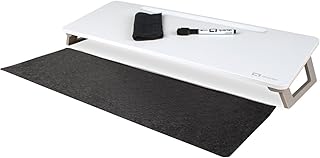
The Quartet Dry Erase White Board is designed to sit between a keyboard and monitor, offering an organized surface for quick notes. Its magnetic desk pad helps keep items in place, while the included felt pad supports keyboard storage to reduce clutter. The painted steel surface is built to resist marker stains and ghosting, enabling repeated note-taking without visible transfers. This option emphasizes desk organization and easy erasing for rapid idea capture.
TSJ OFFICE Small Desktop Whiteboard

The TSJ OFFICE model prioritizes space efficiency with a slope-angled surface between a keyboard and monitor for comfortable writing and reading. The smooth glass surface supports easy erasing and consistent white readability, helping prevent ghosting over time. A built-in drawer and a long top tray provide convenient storage for markers, erasers, and other desk essentials, making it a compact, all-in-one workstation accessory.
Dry Erase Mouse Pad by AWELUX

The AWELUX Dry Erase Mouse Pad combines a writable, erasable surface with a large, non-slip mat. Made from a waterproof PVC material, it stands up to spills and daily use. The large size accommodates both mouse movement and note-taking, while the non-porous surface supports easy cleanup with a dry or damp towel. This option suits busy desks that require a durable, all-in-one writing and work surface.
SELEAD Desktop Glass Whiteboard

The SELEAD Glass Whiteboard combines a writing surface with a wireless charging station. The tempered glass surface resists scratches and maintains clarity for long-term use. An integrated charging pad reduces cable clutter, while silicone padding under the glass and protective feet minimize slipping and protect the desk. This option blends technology with dry erase functionality for a modern workspace.
LOUKIN Erasable Desk Mat

The LOUKIN Erasable Desk Mat offers a 3-in-1 solution: desk mat, mouse pad, and planning calendar. Its matte surface reduces glare for easier writing, while the included markers and cleaning cloth support immediate note-taking and cleanup. With a broad 32″ by 14″ footprint, it provides ample space for schedules, to-dos, and quick sketches, helping to keep a desk organized and legible.
Buying Guide
Choosing the right dry erase computer pad involves evaluatingSurface type and erasing quality: glass, steel, or PVC surfaces each have distinct ghosting tendencies and ease of cleaning. A smooth, wipe-clean surface helps maintain legibility over time.
Desk compatibility and organization features matter: some pads include drawers, trays, or keyboard storage to reduce clutter and improve workflow between typing and note-taking. Consider whether you need integrated storage or something with a simple writing area.
Size and layout influence usability: smaller pads fit tight spaces between a keyboard and monitor, while larger mats support full-page planning and multiple notes. If you use wireless charging or other tech features, a pad with built-in charging can reduce cable clutter.
Durability and safety: choose materials that resist staining and ghosting; avoid strong solvents that could damage the surface. For shared or classroom use, opt for surfaces that are clearly readable from typical seating distances and maintain color contrast well.
Maintenance and cleaning: wipe-clean surfaces should be forgiving with dry or damp towels. Some surfaces tolerate markers beyond dry-erase varieties, while others require specific cleaning methods to prevent ghosting.
Ergonomics and ease of use: consider the tilt and height of the pad, the angle for comfortable writing, and whether the pad stays flat during use. A stable, non-slip base helps prevent unwanted movement while you write.