Finding a reliable label printer for mailing helps streamline order fulfillment, reduce errors, and speed up shipping. This guide highlights five top options that pair well with Amazon, eBay, Shopify, Etsy, and USPS workflows. Each model supports wireless or USB connections, thermal printing, and a range of label sizes to fit everyday shipping needs.
| Product | Brand |
|---|---|
| Nelko Bluetooth Thermal Shipping Label Printer | Nelko Store |
| Bluetooth Thermal Shipping Label Printer (KNAON) | KNAON Store |
| Westinghouse Thermal Shipping Label Printer USB | Westinghouse |
| Brother QL-1100c Wide Format Label Printer | Brother |
| Phomemo M110 Label Makers | Phomemo |
Nelko Bluetooth Thermal Shipping Label Printer

The Nelko Bluetooth Thermal Shipping Label Printer offers wireless printing for small businesses. It supports Android, iPhone, and Windows via the NELKO app, with USB printing for Windows and Mac OS. This model accommodates both fanfold and roll labels and prints at 203 DPI with a speed up to 150 mm/s, enabling up to about 72 sheets of 4×6 labels per minute. Label widths range from 1.54″ to 4.1″ (40–104 mm), covering common 4×6, 3×2, 3×1, and 2×1 formats. A key consideration is that Bluetooth connections must go through the app, not direct pairing, and Mac users on M1/M2 should use the app for wireless printing. This printer aims to minimize ink costs by using direct thermal printing.
Bluetooth Thermal Shipping Label Printer (KNAON)
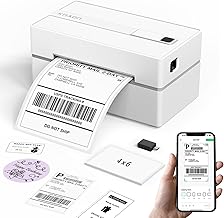
The KNAON Bluetooth Shipping Label Printer provides wireless printing via Bluetooth with support for iOS and Android through the FlashLabel Pro app. Windows 7+ can print via Bluetooth using the latest driver, while Mac users with M1/M2/M3/M4 can connect via the same app. USB connectivity is also supported across macOS, Windows (7+), ChromeOS, and Linux, with a preloaded USB drive offering drivers and tutorials for quick setup. The printer includes a broad template library (3,000+ templates, 5,000+ icons, 100+ fonts) and supports various thermal paper sizes, making it versatile for shipping labels, DIY labels, barcodes, name tags, and more. Direct Bluetooth pairing is not supported; use the app for connectivity.
Westinghouse Thermal Shipping Label Printer USB

Westinghouse offers a USB-connected thermal label printer designed for high-volume mailing tasks. It’s compatible with USPS, UPS, FedEx, eBay, Shopify, Amazon, and more. This model emphasizes desktop usability and includes sample labels to help users start quickly. The USB interface is straightforward and stable for consistent label output across common 4×6 formats. It is best-suited for users who primarily work from a fixed workstation and prefer a straightforward, plug-and-play setup without wireless networking.
Brother QL-1100c Wide Format Label Printer

The Brother QL-1100c is a wide-format, direct thermal labeling solution designed for high-speed shipping and comprehensive label printing, including postage and barcodes. It supports 4” x 6” formats and is compatible with various DK label rolls. USB connectivity ensures straightforward integration with desktop setups. The device is sized for desktop use and targets users who require fast throughput and wide label options for bulk mailings, large orders, and professional packaging workflows.
Phomemo M110 Label Makers

The Phomemo M110 offers compact, portable labeling for small businesses, supporting Bluetooth printing for labels, barcodes, addresses, and more. It focuses on mobile-friendly use with easy pairing to phones and PCs, making it suitable for on-the-go labeling tasks, small shipments, or temporary workspaces. Depending on the app ecosystem, this device can handle a variety of label types and sizes, though it may be more limited in output speed compared with larger desktop units. It’s positioned for flexibility and mobility in everyday shipping tasks.
Buying Guide
When selecting a label printer for mailing, consider the following factors to match your workflow and budget:
- Connectivity: Determine whether you need USB, Bluetooth, or Wi‑Fi; wireless options enable mobile printing from phones and tablets, while USB is ideal for a fixed workstation.
- Label compatibility: Verify supported label sizes (common options include 4×6 and 3×2) and whether the printer accepts both fanfold and roll labels.
- Print quality and speed: Look for DPI (dots per inch) and speed (mm/s) to balance clarity with throughput. Higher DPI is beneficial for small text and barcodes.
- Operating system support: Ensure compatibility with Windows, macOS, ChromeOS, iOS, and Android as needed by your team and customers.
- App ecosystem: Some printers rely on companion apps for wireless printing; assess app quality, templates, and driver availability.
- Reliability and maintenance: Consider thermal printers to avoid ink and toner costs, the availability of replacement parts, and warranty terms.
- Privacy and security: If working with sensitive customer data, ensure secure app connections and regular software updates.
For small business labeling needs, weigh the trade-offs between portability and throughput. Wireless models provide flexibility for popping labels from anywhere, while USB-based devices often deliver steadier performance in a dedicated workspace. Template libraries and driver availability can influence setup time and ongoing efficiency.