Answer: These large-format printers combine wide-format printing with scanning, copying, and often faxing, making them ideal for small to medium offices, architects, designers, and photographers who need up to 13 x 19 inch output and reliable document handling. The top picks below balance speed, paper capacity, and flexible connectivity. Best fits include: office teams needing fast multi-function devices, design studios requiring wide-format color, and small businesses seeking all-in-one versatility. The quick reference table below highlights the five chosen models and their strengths.
| Product | Brand | Best For | Key Strength |
|---|---|---|---|
| Epson WorkForce Pro WF-7820 | Epson | Offices needing 13 x 19 in wide-format | Speed and precision for wide prints |
| HP OfficeJet Pro 9730 | HP | Color documents and floor plans | Fast color, multi-tray flexibility |
| Epson WorkForce Pro WF-7840 | Epson | Wide-format color & heavy use | High capacity, 50-page ADF |
| HP OfficeJet Pro 9720 | HP | Office-wide color output | 11 x 17 capability with duplex |
| Epson EcoTank ET-15000 | Epson | Low-cost per page color printing | Supertank ink system |
Epson WorkForce Pro WF-7820 Wide-Format All-in-One

The WF-7820 is designed for offices that need reliable 13 x 19 inch printing with multiple functions in one device. It uses PrecisionCore Heat-Free technology to deliver high-speed color and black prints, with a quick first page out. The 50-page ADF and 250-sheet paper capacity support busy workflows. Best for: small design teams and architectural offices that value fast wide-format output and integrated scanning. Caution: Use of non-genuine cartridges can affect warranty coverage as noted by Epson.
HP OfficeJet Pro 9730 Wide-Format All-in-One

This HP model targets offices needing robust color printing up to 11 x 17, plus scan, copy, and fax. It includes auto 2-sided printing, a single-pass duplex ADF, and two 250-sheet trays, making it suitable for Excel-heavy reports and color proposals. Best for: mid-sized offices that rely on color documents and frequent multi-page scanning. Caution: Instant Ink trial is optional; ongoing ink costs depend on usage and plan selection.
Epson WorkForce Pro WF-7840 Wireless Wide-Format

The WF-7840 handles wide-format color printing up to 13 x 19 with strong paper capacity (500 sheets) and a 50-page ADF for busy environments. Its PrecisionCore Heat-Free technology aids fast printing, while built-in wireless keeps devices connected. Best for: offices that require frequent wide-format proofs and color posters. Caution: Larger footprint; ensure desk space fits the unit and paper tray setup.
HP OfficeJet Pro 9720 Wide-Format
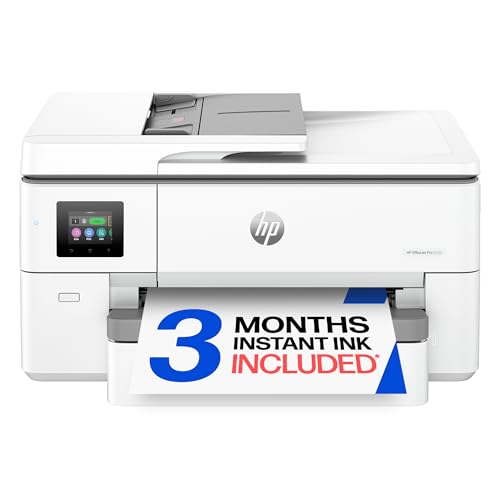
Designed for offices needing color output up to 11 x 17 with duplex scanning and printing, the 9720 combines fast print speeds with automatic two-sided workflows. It’s best for: teams producing color-filled floor plans, marketing decks, and large spreadsheets. Limitation: Ink lifecycle and Instant Ink trials may incur ongoing costs after promotional periods.
Epson EcoTank ET-15000 Wireless Supertank

The ET-15000 uses a cartridge-free ink system for low-cost per page color printing. It offers all-in-one capabilities with scanning, copying, and fax, plus Ethernet connectivity. Best for: homes or small offices seeking long-term cost savings on color printing, with occasional wide-format output up to 13 x 19. Caution: Initial ink bottle cost is higher upfront, and refill intervals depend on usage.
Buying Guide: Key Purchase Considerations
- Wide-Format Needs: If you print up to 13 x 19 inches regularly, prioritize models labeled as wide-format with dedicated paper handling for larger media.
- Ink System vs. Cartridges: Supertank ink systems (ET-15000, similar HP models) offer lower per-page costs but require careful refilling; cartridge-based printers (Epson and HP) have simpler maintenance but potentially higher running costs.
- Multi-Function Capabilities: Assess whether you need only print or full do-it-all devices (scan, copy, fax). ADF size and duplexing speed improve workflow for busy offices.
- Connectivity and Apps: Look for wireless networking, mobile printing apps, and cloud integration to keep teams productive remotely and on-site.
- Paper Capacity and Trays: Higher sheet capacity reduces refill frequency. Two 250-sheet trays or a 500-sheet tray setup supports larger documents and longer print runs.
- Warranty and Support: Brand-specific guidance on cartridge use and warranty coverage can affect long-term costs and downtime.
- Space and Footprint: Wide-format printers can be sizable. Verify desk or storage space to ensure proper placement and accessibility of trays and ADF.
Frequently Asked Questions
- What is wide-format printing best used for?
– It is ideal for posters, architectural plans, and large color documents up to 13 x 19 inches. - Do Supertank printers save money over time?
– They can, especially for high-color usage, due to lower ink cost per page, though initial ink bottle costs are higher. - Is duplex printing important for offices?
– Yes, it reduces paper usage and speeds up double-sided document workflows, saving time and materials. - Which model suits a design team on a budget?
– The Epson ET-15000 offers low ongoing costs with a wide-format capability, while the HP 9730 provides strong color output and office features. - Do these printers require ongoing maintenance?
– Yes, including recommended cartridge or ink replacements, printhead care, and occasional calibration for color accuracy. - Can these devices fax?
– Several models in this set include fax functionality as part of the multifunction feature set.