When shopping for a printer cable for Mac, the key is ensuring compatibility between USB-C equipped Macs and USB-B printers or MIDI devices. The best choices here balance compatibility, data transfer speed, and plug‑and‑play convenience without drivers. This guide highlights five top options and explains who they’re best for, plus practical buying tips to avoid common compatibility issues.
Summary table of selected products
| Product | Best For | Key Benefit | Potential Limitation |
|---|---|---|---|
| CableCreation USB B to USB C Printer Cable 6.6FT | MacBook Pro / Air users needing USB‑C to legacy USB‑B devices | Versatile USB‑C to B 2.0; supports printers and MIDI gear | USB 2.0 speeds only |
| UGREEN USB B to USB C 6 FT Printer Cable | MacBooks and iPads working with printers or audio devices | Wide compatibility; plug‑and‑play | USB 2.0 speeds; no driver requirement details |
| sweguard 2‑in‑1 USB‑B to USB‑C Cable | Mac users needing USB‑C and USB‑A options | 2‑in‑1 versatility; broad USB support | Some devices may perform better with dedicated USB‑C or USB‑A ports |
| ULIFTUS USB‑B to USB‑C Printer Cable | MacBook users seeking gold‑plated connectors | Gold plating for signal clarity and corrosion resistance | Limited data on performance beyond 480 Mbps |
| Storel Type C Printer Cable for Mac | MacBook Pro/Air users with printers and MIDI gear | Broad compatibility; clear notes on device limits | Some cautions about device compatibility with certain printers |
CableCreation USB B to USB C Printer Cable 6.6FT

This USB‑C to USB‑B cable is designed for MacBook Pro, MacBook Air, and other USB‑C devices to connect with USB B printers, scanners, MIDI controllers, and keyboards. It supports USB 2.0 high‑speed transfers up to 480 Mbps, which is suitable for document printing and basic data tasks. Best for: Mac users who need a straightforward USB‑C to USB‑B solution for legacy printers or MIDI gear.
Why selected: It combines compatibility with a variety of USB‑B peripherals and a familiar USB‑C plug that modern Macs use. Caution: It is a USB‑2.0 cable, so you won’t get USB‑3.x speeds with compatible devices. Confirm your printer’s USB port type is USB 2.0 B, not USB 3.1 B or Mini‑USB.
UGREEN USB B to USB C 6 FT Printer Cable

This cable supports USB B devices and USB‑C hosts, making it a versatile option for MacBook Pro/Air and iPad users who need to connect to printers, Yamaha keyboards, DACs, or DJ controllers. It emphasizes plug‑and‑play use without drivers. Best for: Mac users who want broad compatibility with printers and audio devices in one cable.
Caution: It’s USB 2.0, so while reliable, it won’t accelerate data transfers beyond 480 Mbps. Backward compatibility with older USB standards ensures broad device support, but verify your printer uses a USB 2.0 B port.
sweguard 2‑in‑1 USB‑B to USB‑C Cable

This 2‑in‑1 cable supports USB B to USB C and USB A connections, increasing versatility for users bridging multiple devices like printers, MIDI controllers, and digital pianos. Best for: Mac users who frequently switch between USB‑C and USB‑A peripherals. It offers wide compatibility and easy plug‑and‑play setup.
Limitation: Some devices may perform better with a dedicated USB‑C or USB‑A port due to specific driver or power requirements. Check that your printer and keyboard are compatible with USB‑B 2.0 ports.
ULIFTUS USB‑B to USB‑C Printer Cable

ULIFTUS offers a USB‑C to USB‑B printer cable with gold‑plated connectors, aimed at MacBook Pro/Air users who want improved signaling integrity and corrosion resistance for stable connections. Best for: users who value connector longevity and reduced interference in environments with many cables. It supports USB 2.0 speeds and backward compatibility with older USB standards.
Caution: Gold plating improves durability but does not change maximum data rate; expect similar performance to other USB‑2.0 cables. Ensure your printer supports USB‑B 2.0 ports for best results.
Storel Type C Printer Cable for Mac
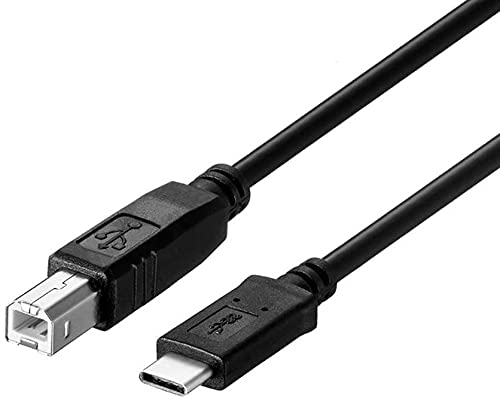
Storel’s Type‑C to USB‑B cable emphasizes broad Mac compatibility, suitable for MacBook Pro, MacBook Air with M1, iMac Pro, and printers from major brands. Best for: Mac users who need a widely compatible bridge to legacy printers and MIDI devices. The product notes warn about device limitations with certain printers connected to mobile devices.
Caution: The listing includes important device‑compatibility notes; verify that your specific printer model is supported in USB‑B 2.0 mode and that you’re connecting a non‑mobile version of your device when printing from a Mac computer.
Buying Guide: How To Choose The Right USB B To USB C Cable For Mac
- What device will you connect to your Mac? If you mainly need to print from a USB printer, a USB‑C to USB‑B printer cable is typically sufficient. If you use MIDI devices or audio gear, confirm that the cable supports USB‑B and the device’s required port.
- Is USB 2.0 enough for your needs? All products listed here are USB‑2.0, offering up to 480 Mbps. For basic printing and MIDI data, this is usually adequate, but if you require high‑speed transfers for large files, consider alternatives with newer standards if available.
- Are you bridging USB‑C and USB‑A devices? Some cables offer 2‑in‑1 USB‑C/USB‑A compatibility, which is helpful if you frequently switch between different peripherals.
- Connector quality matters. Gold plating or corrosion‑resistant features can improve long‑term reliability, especially in busy desks with many connections.
- Device compatibility notes matter. Some cables include cautions about certain printers or mobile devices; always check the printer model and driver requirements before purchase.
- Length and endurance. 6.6 feet is a common length that balances reach with signal loss. If your setup requires more distance, ensure the cable maintains signal integrity at longer runs.
Frequently Asked Questions
- Do USB‑C to USB‑B cables work with all printers? Not all printers have USB‑B ports; verify that your printer accepts USB‑B connections and that it is compatible with USB‑B 2.0.
- Is USB 2.0 fast enough for printing? Yes for typical document printing and basic scanning tasks. USB 2.0 provides reliable speeds without driver requirements in most cases.
- Can I use these cables with MIDI devices? Yes, several options support MIDI controllers and keyboards in addition to printers.
- What should I do if my Mac won’t recognize the printer? Ensure the printer is powered, check the port type (USB‑B vs Mini‑USB), and confirm the USB‑C port on the Mac is functioning. Rebooting the Mac and printer can help in some cases.
- Are any of these cables compatible with USB‑A printers? Some options are dual‑port or 2‑in‑1 cables that also support USB‑A devices; verify the port on the printer before buying.
- Do these cables require drivers? Generally no drivers are needed for basic USB‑B to USB‑C connections, but always check your printer’s requirements.