Home golfers increasingly blend hitting nets with projection screens to create immersive practice bays. The following selections pair sturdy nets with projector-ready screens, delivering realistic visuals while protecting floors and walls. Each option suits different spaces, budgets, and simulator setups, from compact garages to dedicated indoor bays. Read on to compare features, installation needs, and long‑term durability for a setup that fits your swing and your room.
Summary of Selected Products
| Product | Brand | Size | Screen Type | Best For |
|---|---|---|---|---|
| ZEALFEEL Golf Simulator Cage | ZEALFEEL | 10×8 ft | Dual‑layer HD simulator screen | Indoor/outdoor practice with projection |
| GoSports Range Cage | GoSports | 10×8 ft | 88×80 in impact screen | Versatile cage with shank nets |
| GoSports Golf Simulator Impact Screen | GoSports | Varies (Choose Size) | GOLF PROJECTOR SCREEN | Standalone projection backup for simulators |
| Durbles Golf Simulator Impact Screen | Durbles | — | Triple-layer launch monitor screen | Durable, quiet practice backdrop |
| River Hill Golf Cage With Screen | River Hill Golf | 10×8 ft | Projection-compatible sim screen | Indoor/outdoor use with sound dampening |
ZEALFEEL Golf Simulator Cage With Side Barriers & Impact Screen

The ZEALFEEL setup combines a 10×8 ft practice cage with a dual‑layer HD impact screen designed for projection. It integrates a 6‑ply anti‑tear net and a reinforced frame with 16 mm fiberglass poles and a steel base, delivering stability during high‑speed swings. The design supports both outdoor practice and indoor simulation, allowing users to pair the cage with a golf simulator or a separate projector. The foam‑lined base helps minimize rebound and keeps the playing area clear. This cage is built to endure frequent use while containing balls safely in varied environments.
Key benefits include a 10×8 ft hitting area, side barriers, and top protection, which reduce stray balls and noise. The screen backdrop provides a clear projection surface, improving image sharpness and chase‑down feedback from launch monitors. The assembly emphasizes durability and portability, making it suitable for garages, basements, or backyards where space matters. Note that projector and monitor equipment are not included.
GoSports Range Cage 10×8 Golf Practice Net With Simulator Impact Screen

This range cage pairs a 10×8 ft practice net with an 88×80 inch high‑density impact screen designed for use with golf simulators and projectors. The cage includes built‑in shank nets on each side and protective netting on top to keep mis-hits contained. The impact screen is engineered to handle diverse ball speeds, providing a stable projection backdrop when paired with a compatible projector or launch monitor. A foam‑lined base reduces rebounding and prevents balls from sliding under the frame, helping maintain a safe practice zone during extended sessions.
Build quality emphasizes durability, with a strong frame and robust netting that withstands repeated use. This setup is well suited for garages, sheds, or back rooms where space is limited but visual feedback from projection is desired. Pair it with your favorite projector or monitor to maximize hitting data and ball flight visualization without sacrificing containment or acoustics.
GoSports Golf Simulator Impact Screen (Choose Size)

This GoSports impact screen is designed as a projector-friendly backdrop for golf simulators. The high‑density woven polyester fabric provides durability as shots are unleashed, with a size range that supports different bays. The screen is intended for use with real golf balls, and it includes mounting options via corner grommets for easy installation. It can be hung alone or connected to a compatible net system to form a complete simulator enclosure. The universal mounting approach ensures compatibility with many projector setups and launch monitor configurations.
Practical notes include choosing a screen size that matches your space and projector projection area. It is designed to withstand frequent ball impacts while maintaining clear projection, improving visual clarity and feedback. It’s a versatile option for those who want a dedicated screen surface without building a full enclosure around the hitting area.
Durbles Golf Simulator Impact Screen

Durbles offers a premium triple‑layer screen designed for high‑impact practice. The outer HD layer handles projection, while a middle damping layer reduces vibrations and a resilient inner layer absorbs ball impact. This construction aims to deliver consistent visuals and long‑lasting performance in busy home bays or small facilities. The screen’s robust build makes it suitable for repeated use with projectors and launch monitors, providing a stable backdrop for data collection and training feedback.
Customers can expect a protective, quiet training environment thanks to the damping layer, which minimizes noise and ball rebound. Grommets and cord attachments enable secure mounting, ensuring the screen remains taut during vigorous sessions. This screen is ideal for dedicated practice spaces where durability and projection quality are priorities.
GoSports 10×8 ft Golf Simulator Enclosure Net

This enclosure kit from GoSports provides a complete 10x8x6 ft net enclosure with a high‑quality HD impact screen. The steel frame is reinforced, and foam padding on the inner frame reduces ball rebound, helping protect both balls and room surfaces. It is designed to fit with major launch monitors and projectors (not included), offering a turnkey solution for a professional‑style indoor practice area. The enclosure dimensions and top/side protections help create a realistic golfing environment while containing shots of varying speeds and trajectories.
Setup considerations include ensuring adequate space for a full swing and checking clearance for projector placement. The kit’s universal compatibility makes it suitable for many home golf bays, offices, or garages, letting you pair with your existing projector or monitor for an integrated practice experience without sacrificing containment or safety.
Golf Cage With Impact Screen, 10×8 Ft
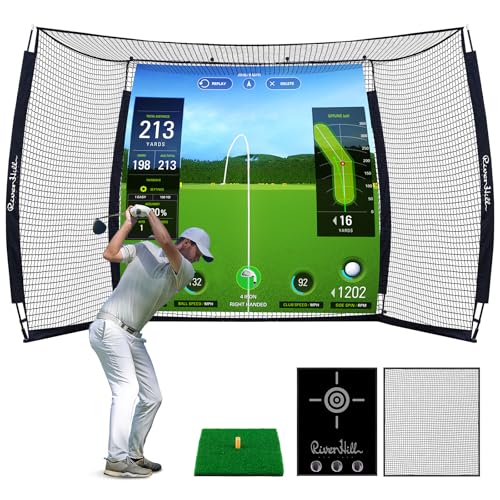
River Hill’s 10×8 ft golf cage emphasizes 2‑in‑1 versatility for indoor and outdoor use. The kit includes a blank sim screen designed for projection compatibility, plus a durable impact cloth for training and entertainment. The framing uses 16 mm fiberglass poles and a steel base, with 6‑ply anti‑tear netting and a 700D Oxford cloth outer layer for extra durability. The design prioritizes safety with full protective netting and a sturdy base to minimize frame motion during aggressive swings. It also features ground stakes and sandbags for added stability in windy outdoor setups.
The space inside the cage is roomy enough for full swings, while the top bar helps prevent sagging. This option is well suited to backyards or garages where weatherproofing is a consideration, and it supports projection setups for immersive practice experiences.
Buying Guide
When selecting a golf net projector screen system, consider how the components fit your space, training goals, and technology. The following factors help compare options across brands and models.
- Space and dimensions: Measure your room or garage to ensure the enclosure height, width, and depth leave room for full swings and projector throw distances. Oversized cages offer more training realism but require more footprint.
- Screen quality and projection compatibility: Look for high‑density or dual‑layer HD screens for crisp visuals and durable projection/backdrop performance. Confirm compatibility with your projector, launch monitor, or simulator software.
- Frame durability and safety: A steel base, reinforced poles, and protective netting reduce frame movement and rebound. Foam padding minimizes impact noise and ball ricochet near the frame.
- Setup and take‑down: Some nets and cages offer tool‑free assembly or interlocking designs for fast setup. Considers storage needs and the included carrying bags or transport options.
- Noise reduction and rebound control: Screens and multi‑layer builds with damping materials help reduce sound and bounce, which is especially important in shared spaces or late practice sessions.
- Portability vs. permanence: Decide between a more portable setup for seasonal use or a semi‑permanent installation in a dedicated practice room.
- Warranty and support: Check manufacturer warranties and customer support policies, particularly for high‑use commercial spaces or busy households.
- Upgrade paths: Some systems allow connecting to different projectors or adding side nets and target cloth for expanded training drills.