Connecting a phone, tablet, or laptop to a projector or big-screen TV is simpler than ever with USB-C and Lightning to HDMI cables. This guide highlights five dependable options that deliver up to 4K output, are easy to use, and come with durable builds for home theaters, classrooms, and business presentations. Whether you need to mirror slides, stream videos, or share a game, these cables offer a wired alternative to flaky Wi‑Fi connections.
The table below offers a quick reference to each product, focusing on the core benefit and compatibility to help you pick quickly. All five cables connect from a USB‑C or Lightning device to an HDMI display, with variations in resolution, refresh rate, and charging support to fit different use cases.
| Product | Brand | Key Benefit |
|---|---|---|
| UANTIN USB C To HDMI Cable 6Ft | UANTIN | 4K@30Hz, plug-and-play, durable build |
| Warrky USB C To HDMI Cable 4K 60Hz | Warrky | 4K@60Hz, HDCP, strong braided design |
| Acer USB C To HDMI Cable 6.6Ft | Acer | 4K@60Hz, notes on DisplayPort Alt Mode |
| Kinhaly USB C To HDMI 2-In-1 Adapter | Kinhaly | 4K@60Hz with charging port, two-in-one |
| Uni USB C To HDMI Cable 4K 30Hz | Uni | 4K@30Hz, durable, one-way connection |
UANTIN USB C To HDMI Cable 6Ft

The UANTIN USB-C to HDMI cable is a compact, plug-and-play solution for sharing your screen on a projector, TV, or monitor. It supports 4K content at 30Hz, which is suitable for presentations, slideshows, and most casual video playback. While 4K@60Hz is not supported, the wired connection avoids wireless streaming issues and works with USB-C devices that provide video output, including Android phones and iPhone 15/16 series. It is compatible with laptops and tablets that offer a USB-C video signal and supports connecting one or two displays up to 4K@30Hz when both devices support 4K.
Construction emphasizes durability: a slim aluminum housing, 24K gold-plated connectors, and multi-layer shielding to minimize interference. The nylon braided jacket provides flexibility and resistance to wear, while the single-piece design reduces stress points. The cable is driver-free and ready to use as soon as you plug it in, mirroring or extending your display with no software installation. For multi-monitor setups, ensure both source and display support 4K and the chosen refresh rate.
- 4K@30Hz output; 6 ft length
- USB-C to HDMI; driver-free plug-and-play
- Aluminum housing, gold-plated connectors
- Nylon braided, durable construction
- Compatible with Android and iPhone 15/16 video-out devices
Note: This is a single-direction cable from the USB-C host device to HDMI displays. Verify that your source device supports DisplayPort Alt Mode for video out.
Warrky USB C To HDMI Cable 4K 60Hz

The Warrky USB C to HDMI cable delivers 4K at 60Hz for a crisp, smooth picture on larger screens from USB-C devices. It’s backward compatible with 1440p, 2K, and 1080p, making it versatile for a range of displays and content. HDCP compliance ensures uninterrupted access to streaming content, and the design emphasizes a premium build with gold-plated connectors, a sturdy aluminum shell, and a thick copper core for signal integrity. The cable is one-way, designed to transmit from USB-C host devices to HDMI displays, and supports Thunderbolt 3/4/5 compatibility in practice with compatible hosts.
Its durability comes from a full nylon braided sleeve and robust connectors that resist wear from daily use. The Warrky cable is ideal for presentations, demonstrations, or home theater setups where a reliable wired connection outperforms wireless mirrors. For optimal results, ensure your source supports the target refresh rate and that your HDMI display is compatible with HDCP and the chosen resolution.
- 4K@60Hz, backward compatibility to 1440p/2K/1080p
- HDCP compliant; one-way USB-C to HDMI
- Gold-plated connectors; aluminum housing
- Nylon braided, durable cable
- Thunderbolt 3/4/5 compatible devices (via host support)
Note: This is a one-way cable from USB-C host devices to HDMI displays. Make sure the source device supports DisplayPort Alt Mode for video output.
Acer USB C To HDMI Cable 6.6Ft

The Acer USB-C to HDMI cable supports up to 4K at 60Hz, with backward compatibility to 1440p and 1080p, delivering crystal-clear images for monitors, TVs, and projectors. A notable caveat is that the USB-C port must support DisplayPort Alternate Mode to carry the video signal; some devices may not. The cable length is 6.6 feet, making it suitable for desks and classrooms. It is designed as a plug-and-play solution, removing the need for driver installs and enabling quick screen sharing or streaming.
Build quality highlights include a braided cable, reinforced connectors, and shielding that helps maintain signal integrity. The Acer cable is a practical option for users who want reliable 4K output and a sturdy design, with compatibility notes that help avoid common compatibility gaps. When using it with iPhones or other non-DisplayPort Alt Mode devices, consider alternative adapters designed for those ecosystems.
- 4K@60Hz output; 6.6 ft length
- DP Alt Mode required on USB-C host
- Plug-and-play; HDCP compliant
- Braided cable with reinforced connectors
- Not compatible with devices lacking DisplayPort Alt Mode
Note: It does not support portable monitors or ultrawide monitors in all cases; verify compatibility with your display’s input capabilities before purchasing.
Kinhaly USB C To HDMI 2-In-1 Adapter
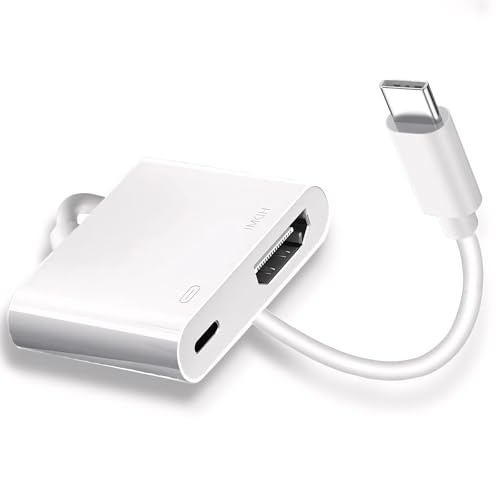
The Kinhaly 2-in-1 USB-C to HDMI adapter adds HDMI output and a charging port, enabling 4K at 60Hz while keeping your device charged. It is designed for iPhone 15/16 series, iPad Pro, MacBook Pro/Air, and other USB-C devices that support display output, including some Galaxy models. The adapter emphasizes a plug-and-play experience, requiring no drivers or Wi‑Fi setup. A secure connection is aided by a stable chassis and a compact, portable form factor that travels well for meetings or on-the-go use.
Key advantages include a built-in charging port for pass-through power, broad device compatibility, and a straightforward setup process. This makes it particularly useful for longer collaboration sessions, screen sharing during presentations, or streaming content while keeping your device charged. The design focuses on reliability and ease of use for users who frequently connect to external displays from Apple and non-Apple USB-C devices alike.
- 4K@60Hz with charging pass-through
- 2-in-1 design: HDMI output plus charging port
- Plug-and-play; no driver required
- Wide compatibility with iPhone, iPad, MacBook, and many USB-C devices
- Durable, compact build for travel
uni USB C To HDMI Cable 4K 30Hz

The uni USB-C to HDMI cable provides 4K output at 30Hz and is designed to connect a USB-C host device directly to an HDMI display. It is a straightforward, single-direction cable intended for devices that support video output via USB-C. The design emphasizes durability with braided nylon and a compact aluminum housing. A small indicator light helps confirm when the connection is active, and the overall construction aims for a reliable, low-latency mirror or extend experience for home theaters, classrooms, or presentations.
Key design features include a compact, durable build, a braided jacket for longevity, and a focus on steady signal transmission from USB-C sources to HDMI displays. This option is ideal for Android devices and other USB-C hosts that provide video output, especially when you want a simple, no-fruss setup for occasional screen mirroring or streaming.
- 4K@30Hz output; braided, durable design
- One-way USB-C to HDMI connection
- Indicator light and sturdy aluminum housing
- Easy, driver-free setup
- Best for Android devices and USB-C hosts with video output
Buying Guide
Choosing the right phone-to-projector cable depends on your devices, desired display quality, and how you plan to use the setup. Here are key purchase considerations and practical comparisons to help you decide.